Best for
- Business-card personalization
- QR and variable-data production
- Metal gift and promotional shops
Watch for
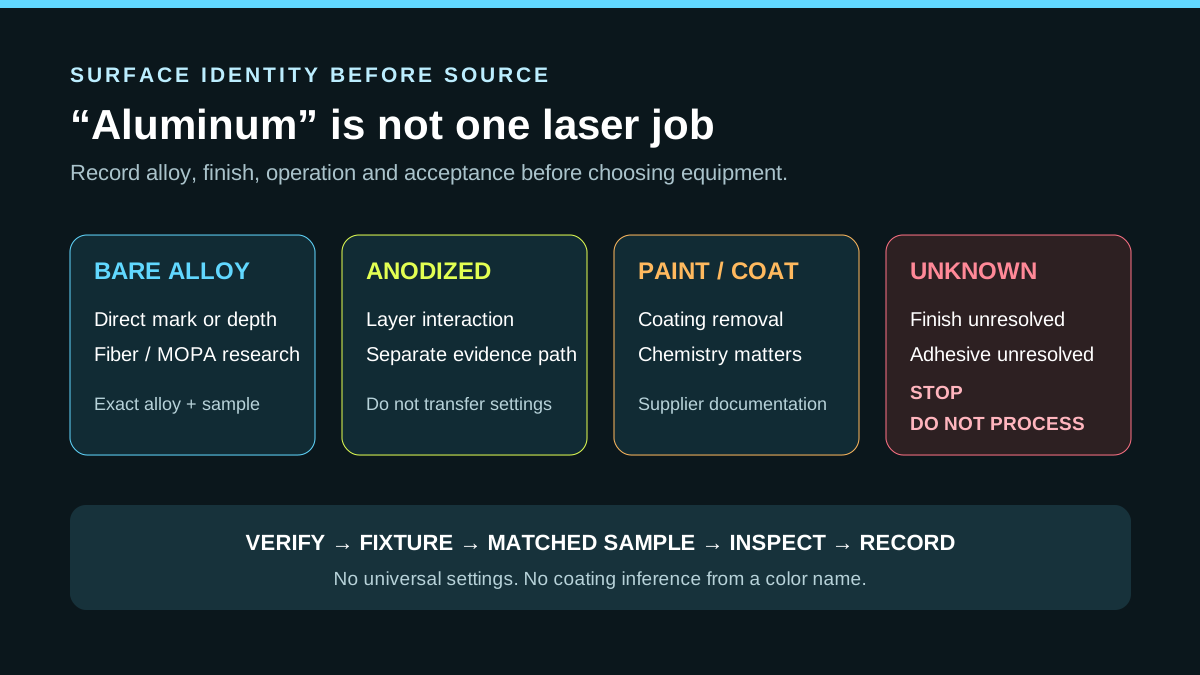
- Color names do not identify coatings
- Thin stock needs flat fixturing
- QR appearance is not scan validation
Machines in this decision
Merchant links are standard outbound links. No active affiliate relationship is recorded, and relationships never affect rankings or tool results. Affiliate status is not a ranking input.
xTool F1 Ultra
Evidence recordDual diode/fiber · 20 W blue diode + 20 W conventional fiber · 220 × 220 mm standard; 220 × 500 mm with current conveyor configuration
- Fit
- lower-cost dual-source workflow
- Watch
- conventional fiber rather than MOPA
- Price context
- $2,999 — US standalone price observed 10 Sep 2026; conveyor and bundles cost more
xTool F2 Ultra
Evidence recordDual diode/fiber · 40 W blue diode + 60 W 1064 nm MOPA · 220 × 220 mm internal area
- Fit
- integrated dual-process workflow
- Watch
- small internal work area
- Price context
- $5,299 — US dual 60 W MOPA + 40 W diode standalone price observed 10 Sep 2026; MOPA-only and bundle prices differ
ComMarker B6 Fiber
Evidence recordFiber · 20 W, 30 W and higher configurations shown on the current page · Lens/configuration dependent
- Fit
- conventional fiber cost comparison
- Watch
- open base configuration requires a controlled-area assessment
- Price context
- $1,599 — US 20 W Basic promotional price observed 7 Sep 2026; power and bundle changes materially change cost
ComMarker B6 MOPA
Evidence recordMOPA fiber · 20 W, 30 W or 60 W configurations · Lens/configuration dependent
- Fit
- dedicated MOPA station
- Watch
- open workflow needs controlled-area assessment
- Price context
- From $2,599 — US 20 W Basic price observed 7 Sep 2026; 30 W and 60 W Basic configurations were $3,099 and $3,999, and control bundles cost more
Monport GM 60W Pro MOPA
Evidence recordMOPA fiber · 60 W · 175 × 175 mm
- Fit
- small-format metal marking
- Watch
- open workflow needs a controlled-area assessment
- Price context
- $4,006.37 — US autofocus Pro price observed 3 Sep 2026; the lower $3,900 option is manual-focus, not the same configuration
Evidence desk
Side-by-side documented facts
Each record shows its evidence date. Prices, bundles, availability and regional terms can change; recheck the exact configuration before purchase.
| Criterion | xTool F1 Ultra | xTool F2 Ultra | ComMarker B6 Fiber | ComMarker B6 MOPA | Monport GM 60W Pro MOPA |
|---|---|---|---|---|---|
| Laser process | Dual diode/fiber · 20 W blue diode + 20 W conventional fiber | Dual diode/fiber · 40 W blue diode + 60 W 1064 nm MOPA | Fiber · 20 W, 30 W and higher configurations shown on the current page | MOPA fiber · 20 W, 30 W or 60 W configurations | MOPA fiber · 60 W |
| Published work area | 220 × 220 mm standard; 220 × 500 mm with current conveyor configuration | 220 × 220 mm internal area | Lens/configuration dependent | Lens/configuration dependent | 175 × 175 mm |
| Enclosure / class context | Integrated enclosed workflow in current official comparison data | Integrated enclosed workflow per current product documentation | Open marking format in the base configuration; enclosure appears only in selected bundles | Open marking format in reviewed product evidence | Open marking format; official manual warns there is no protective housing |
| Ventilation context | Use exact model extraction and material controls | Use model-specific extraction and material controls | Extractor appears only in selected bundles; exact material contaminants control the final design | No universal extraction configuration established | Material-dependent dedicated extraction may be required; no extractor is assumed included |
| Machine dimensions | 273 × 373 × 492 mm in current official comparison data | Not established in the reviewed evidence | Not established in the reviewed evidence | Not established in the reviewed evidence | 400 × 330 × 620 mm |
| Published weight | 14.7 kg (32.4 lb) | Not established in the reviewed evidence | Not established in the reviewed evidence | Not established in the reviewed evidence | 16.6 kg net |
| Rotary compatibility | Not established in the reviewed evidence | RA3 rotary supported; exact object capacity was not established in the reviewed evidence | R5 rotary appears in current Rotary and Ultimate bundles | Not established in the reviewed evidence | Rotary supported; an optional rotary-axis variant was listed at $4,176.37 on 3 Sep 2026 |
| Electrical / cooling | Not established in the reviewed evidence | Not established in the reviewed evidence | Not established in the reviewed evidence | Not established in the reviewed evidence | 110–120 V, 60 Hz US configuration · Air cooled |
| Software | xTool Studio/XCS via USB or Wi-Fi in current official comparison data | xTool Studio/XCS; current official FAQ says F2 Ultra is no longer LightBurn-compatible | Verify the exact current software and license for the selected system | Not established in the reviewed evidence | BslAppSimple and LightBurn on Windows/macOS; USB connection |
| Availability | US standalone and conveyor configurations listed available on 10 Sep 2026 | Official US page stated shipment in 7–9 business days when checked 3 Sep 2026 | 20 W and 30 W configurations listed on the official US page on 8 Sep 2026 | 20 W, 30 W and 60 W configurations listed for sale on the official US page on 7 Sep 2026 | Autofocus Pro configuration listed with an early-October ship estimate on 3 Sep 2026 |
| Published price | $2,999. US standalone price observed 10 Sep 2026; conveyor and bundles cost more | $5,299. US dual 60 W MOPA + 40 W diode standalone price observed 10 Sep 2026; MOPA-only and bundle prices differ | $1,599. US 20 W Basic promotional price observed 7 Sep 2026; power and bundle changes materially change cost | From $2,599. US 20 W Basic price observed 7 Sep 2026; 30 W and 60 W Basic configurations were $3,099 and $3,999, and control bundles cost more | $4,006.37. US autofocus Pro price observed 3 Sep 2026; the lower $3,900 option is manual-focus, not the same configuration |
| Warranty context | Verify current regional policy and exact configuration | Verify current regional policy | Verify current regional warranty and selected configuration before purchase | Verify current regional warranty before purchase | Product page lists two years for the machine and one year for the laser source |
| Specification record date | Sep 10, 2026 | Sep 10, 2026 | Sep 8, 2026 | Sep 7, 2026 | Sep 3, 2026 |
| Later field checks | No separately dated field update | No separately dated field update | No separately dated field update | No separately dated field update | No separately dated field update |
Best for coated or anodized card blanks
Begin with the supplier's exact blank and layer documentation. A documented diode, CO2 or infrared workflow may remove a dark coating or interact with anodizing without directly engraving the underlying metal.
Keep coating removal separate from bare-metal marking. A black, gold or rainbow marketplace label does not establish chemistry.
Best for bare-metal cards
Conventional fiber is the first research path for direct marking when an exact blank passes contrast and durability criteria. MOPA is justified only when pulse control creates a better accepted result or credible cycle on the same card.
Current F2 Ultra documentation routes aluminum and other metals to its MOPA infrared source. B6 conventional-fiber and MOPA product pages provide alternative quote paths; none is an EtchCompass-tested winner.
Build a flat, keyed fixture
Use a repeatable fixture that keeps thin cards flat, controls orientation and exposes the intended safe field without defeating the machine protection system. Separate blank colors and lots when coatings differ.
Document the fixture, focus method, source, lens and inspection result with the exact blank SKU.
Verify names, QR codes and finished batches
Treat variable names, titles, numbers and URLs as controlled order data. Verify spelling and orientation before marking; scan every critical QR or data code using the defined method after processing.
Finished capacity includes import, proof, fixture loading, marking, verification, cleaning, sorting and packing. Published galvo speed is not cards per hour.
Who should choose neither
Choose neither when the card construction is unknown, the mark cannot meet scan or readability criteria, the thin stock cannot be controlled, or the installation lacks the required beam and contaminant controls.
Printing, mechanical engraving or outsourcing can be stronger for very low volume, full-color artwork or unresolved coatings.
Metal-card machine and material sources were rechecked 10 Sep 2026. EtchCompass did not test a card batch or claim a production rate.
Decision criteria
Primary and authoritative sources
A source link supports the stated fact; it is not an endorsement.
- xTool F2 Ultra: xTool F2 Ultra material routing
- ComMarker B6 Fiber: Official ComMarker B6 conventional-fiber product page
- xTool F1 Ultra: xTool F1 Ultra official product page
- OSHA: laser hazards and controls
- xTool F1 Ultra: xTool current machine comparison
- xTool F2 Ultra: xTool F2 Ultra official product page
- xTool F2 Ultra: xTool F2 Ultra official manual
- ComMarker B6 MOPA: Official ComMarker B6 JPT MOPA page
- Monport GM 60W Pro MOPA: Official GM60 Pro MOPA product page
- Monport GM 60W Pro MOPA: Official GM Pro quick-start manual