Best for
- Corporate-gift personalization
- Pen makers
- Retail and e-commerce engraving
Watch for
- A color name does not identify the coating
- Curvature shrinks the usable field
- Customer spelling and orientation need verification
Machines in this decision
Merchant links are standard outbound links. No active affiliate relationship is recorded, and relationships never affect rankings or tool results. Affiliate status is not a ranking input.
ComMarker B6 Fiber
Evidence recordFiber · 20 W, 30 W and higher configurations shown on the current page · Lens/configuration dependent
- Fit
- conventional fiber cost comparison
- Watch
- open base configuration requires a controlled-area assessment
- Price context
- $1,599 — US 20 W Basic promotional price observed 7 Sep 2026; power and bundle changes materially change cost
ComMarker B6 MOPA
Evidence recordMOPA fiber · 20 W, 30 W or 60 W configurations · Lens/configuration dependent
- Fit
- dedicated MOPA station
- Watch
- open workflow needs controlled-area assessment
- Price context
- From $2,599 — US 20 W Basic price observed 7 Sep 2026; 30 W and 60 W Basic configurations were $3,099 and $3,999, and control bundles cost more
xTool F2 Ultra
Evidence recordDual diode/fiber · 40 W blue diode + 60 W 1064 nm MOPA · 220 × 220 mm internal area
- Fit
- integrated dual-process workflow
- Watch
- small internal work area
- Price context
- $5,299 — US dual 60 W MOPA + 40 W diode standalone price observed 10 Sep 2026; MOPA-only and bundle prices differ
WeCreat Lumos Flex
Evidence recordDual diode/fiber · 15 W fiber + 15 W diode · 116 × 116 mm; optional slide expands length
- Fit
- mixed small-format personalization
- Watch
- very small standard area
- Price context
- $1,990 — US promotional price observed 3 Sep 2026; verify bundle
xTool P2S
Evidence recordCO2 · 55 W · 600 × 305 mm
- Fit
- premium enclosed CO₂ workflow
- Watch
- regional SKU/class and warranty must match
- Price context
- $2,799 — US standalone displayed price observed 15 Sep 2026; storefront also labeled P2S Pre Order, so dispatch remains unresolved
Evidence desk
Side-by-side documented facts
Each record shows its evidence date. Prices, bundles, availability and regional terms can change; recheck the exact configuration before purchase.
| Criterion | ComMarker B6 Fiber | ComMarker B6 MOPA | xTool F2 Ultra | WeCreat Lumos Flex | xTool P2S |
|---|---|---|---|---|---|
| Laser process | Fiber · 20 W, 30 W and higher configurations shown on the current page | MOPA fiber · 20 W, 30 W or 60 W configurations | Dual diode/fiber · 40 W blue diode + 60 W 1064 nm MOPA | Dual diode/fiber · 15 W fiber + 15 W diode | CO2 · 55 W |
| Published work area | Lens/configuration dependent | Lens/configuration dependent | 220 × 220 mm internal area | 116 × 116 mm; optional slide expands length | 600 × 305 mm |
| Enclosure / class context | Open marking format in the base configuration; enclosure appears only in selected bundles | Open marking format in reviewed product evidence | Integrated enclosed workflow per current product documentation | Marketed as a fully enclosed desktop design, but no Class 1 rating was established; handheld use changes the exposure context | Sold in documented Class 1 and Class 4 versions; verify the exact SKU before purchase |
| Ventilation context | Extractor appears only in selected bundles; exact material contaminants control the final design | No universal extraction configuration established | Use model-specific extraction and material controls | Extractor depends on bundle | Built-in 145 CFM exhaust fan and exhaust hose; official guidance routes outdoors and filtration is optional |
| Machine dimensions | Not established in the reviewed evidence | Not established in the reviewed evidence | Not established in the reviewed evidence | 242 × 268 × 350 mm | 1,000 × 639 × 268 mm |
| Published weight | Not established in the reviewed evidence | Not established in the reviewed evidence | Not established in the reviewed evidence | 3.066 kg handheld / 7.5 kg desktop in the official specification | 45 kg (99.21 lb) |
| Rotary compatibility | R5 rotary appears in current Rotary and Ultimate bundles | Not established in the reviewed evidence | RA3 rotary supported; exact object capacity was not established in the reviewed evidence | Rotary supported | Optional rotary; official FAQ lists geometry limits that change when the riser base is used |
| Electrical / cooling | Not established in the reviewed evidence | Not established in the reviewed evidence | Not established in the reviewed evidence | Not established in the reviewed evidence | Maximum machine input listed as 700 W; verify the selected regional voltage and complete accessory load · Built-in liquid-cooling system requires purified water and model-specific, temperature-dependent antifreeze preparation |
| Software | Verify the exact current software and license for the selected system | Not established in the reviewed evidence | xTool Studio/XCS; current official FAQ says F2 Ultra is no longer LightBurn-compatible | MakeIt and LightBurn on Windows/macOS; exact version/configuration compatibility applies | xTool Studio/XCS by USB, Wi-Fi or IP; LightBurn works by cable but does not support the cameras or autofocus |
| Availability | 20 W and 30 W configurations listed on the official US page on 8 Sep 2026 | 20 W, 30 W and 60 W configurations listed for sale on the official US page on 7 Sep 2026 | Official US page stated shipment in 7–9 business days when checked 3 Sep 2026 | Listed for sale on the US product page on 3 Sep 2026 | US standalone and bundles listed for sale on 3 Sep 2026; recheck the exact SKU, classification and cart |
| Published price | $1,599. US 20 W Basic promotional price observed 7 Sep 2026; power and bundle changes materially change cost | From $2,599. US 20 W Basic price observed 7 Sep 2026; 30 W and 60 W Basic configurations were $3,099 and $3,999, and control bundles cost more | $5,299. US dual 60 W MOPA + 40 W diode standalone price observed 10 Sep 2026; MOPA-only and bundle prices differ | $1,990. US promotional price observed 3 Sep 2026; verify bundle | $2,799. US standalone displayed price observed 15 Sep 2026; storefront also labeled P2S Pre Order, so dispatch remains unresolved |
| Warranty context | Verify current regional warranty and selected configuration before purchase | Verify current regional warranty before purchase | Verify current regional policy | 12 months | US P2-series terms: 12 months main components, six months laser tube and three months mirrors/focusing lens; regional terms differ |
| Specification record date | Sep 8, 2026 | Sep 7, 2026 | Sep 10, 2026 | Sep 3, 2026 | Sep 7, 2026 |
| Later field checks | No separately dated field update | No separately dated field update | No separately dated field update | No separately dated field update | price: Sep 15, 2026 — USD 2,799 — P2S standalone displayed offer; availability: Sep 15, 2026 — Pre Order label displayed; exact dispatch date not established |
Best for identified metal pen barrels
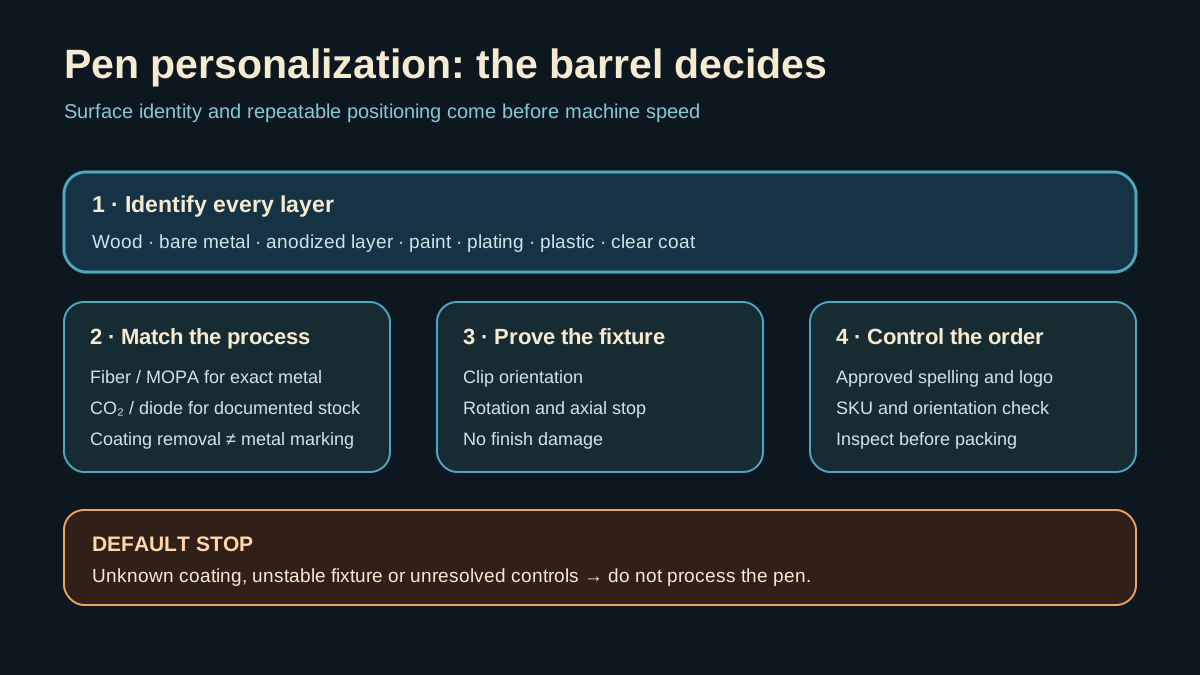
A conventional fiber system is the first research path for direct marking on a documented compatible bare-metal barrel. MOPA enters only when the exact alloy and finish require pulse-control behavior that produces a repeatable, saleable result.
Coating removal, anodized-layer interaction and direct metal marking are separate operations. Record the substrate, plating, paint, lacquer and any clear coat.
Best for identified wood or coated pens
A documented CO2 or enclosed-diode workflow may suit exact wood and selected coated pens. That route does not establish direct bare-metal marking, and an unknown lacquer or plastic sleeve remains unverified.
Keep separate material records for every pen SKU and color. Supplier changes can alter the coating even when the catalog name stays the same.
Build the fixture around the engraving band
Gravotech documents pen positioning and batch fixtures. A defensible fixture keys clip direction, barrel rotation and axial location without damaging the finish; it also prevents mixed-SKU loading.
A rotary is not automatically required for a small logo that fits the stable top surface. Full-wrap or larger curved work needs an exact supported rotary and clearance plan.
Control names, logos and batches
Separate customer-entered text from the production file, lock approved spelling and orientation, and verify the marked part against the order before packing. Batch capacity includes import, proof, fixture loading, marking, inspection and sorting.
Gravotech documents batch pen placement, but its vendor throughput claims are not a cross-machine benchmark. Use observed finished-cycle time from the exact shop workflow.
Who should choose neither
Choose neither when barrel composition or coating is unknown, the fixture cannot control rotation, fine text cannot pass inspection, or the required open-beam controls are unresolved.
Mechanical or diamond engraving can be a valid alternative for selected metal pens and a different aesthetic. Compare the finished result, handling and installed workflow rather than assuming laser is always best.
Pen-personalization sources were rechecked 9 Sep 2026. No manufacturer revenue or speed claim is treated as an EtchCompass result.
Decision criteria
Primary and authoritative sources
A source link supports the stated fact; it is not an endorsement.
- Gravotech: gift and pen personalization
- Gravotech: production positioning jigs
- OSHA: laser hazards and controls
- ComMarker B6 Fiber: Official ComMarker B6 conventional-fiber product page
- ComMarker B6 MOPA: Official ComMarker B6 JPT MOPA page
- xTool F2 Ultra: xTool F2 Ultra official product page
- xTool F2 Ultra: xTool F2 Ultra official manual
- xTool F2 Ultra: xTool F2 Ultra material routing
- WeCreat Lumos Flex: Official Lumos Flex product page
- xTool P2S: Official xTool P2S US product page
- xTool P2S: Official xTool P2S user guide
- xTool P2S: Official P2S classification and material-safety guidance
- xTool P2S: Official P2-series warranty periods