Best for
- Pet stores adding personalization
- E-commerce tag businesses
- Engravers comparing coated and bare-metal workflows
Watch for
- A dog-tag label does not identify the alloy
- Readability and durability need acceptance tests
- Small parts require repeatable fixturing
Machines in this decision
Merchant links are standard outbound links. No active affiliate relationship is recorded, and relationships never affect rankings or tool results. Affiliate status is not a ranking input.
ComMarker B6 Fiber
Evidence recordFiber · 20 W, 30 W and higher configurations shown on the current page · Lens/configuration dependent
- Fit
- conventional fiber cost comparison
- Watch
- open base configuration requires a controlled-area assessment
- Price context
- $1,599 — US 20 W Basic promotional price observed 7 Sep 2026; power and bundle changes materially change cost
ComMarker B6 MOPA
Evidence recordMOPA fiber · 20 W, 30 W or 60 W configurations · Lens/configuration dependent
- Fit
- dedicated MOPA station
- Watch
- open workflow needs controlled-area assessment
- Price context
- From $2,599 — US 20 W Basic price observed 7 Sep 2026; 30 W and 60 W Basic configurations were $3,099 and $3,999, and control bundles cost more
Monport GM 60W Pro MOPA
Evidence recordMOPA fiber · 60 W · 175 × 175 mm
- Fit
- small-format metal marking
- Watch
- open workflow needs a controlled-area assessment
- Price context
- $4,006.37 — US autofocus Pro price observed 3 Sep 2026; the lower $3,900 option is manual-focus, not the same configuration
xTool F2 Ultra
Evidence recordDual diode/fiber · 40 W blue diode + 60 W 1064 nm MOPA · 220 × 220 mm internal area
- Fit
- integrated dual-process workflow
- Watch
- small internal work area
- Price context
- $5,299 — US dual 60 W MOPA + 40 W diode standalone price observed 10 Sep 2026; MOPA-only and bundle prices differ
Evidence desk
Side-by-side documented facts
Each record shows its evidence date. Prices, bundles, availability and regional terms can change; recheck the exact configuration before purchase.
| Criterion | ComMarker B6 Fiber | ComMarker B6 MOPA | Monport GM 60W Pro MOPA | xTool F2 Ultra |
|---|---|---|---|---|
| Laser process | Fiber · 20 W, 30 W and higher configurations shown on the current page | MOPA fiber · 20 W, 30 W or 60 W configurations | MOPA fiber · 60 W | Dual diode/fiber · 40 W blue diode + 60 W 1064 nm MOPA |
| Published work area | Lens/configuration dependent | Lens/configuration dependent | 175 × 175 mm | 220 × 220 mm internal area |
| Enclosure / class context | Open marking format in the base configuration; enclosure appears only in selected bundles | Open marking format in reviewed product evidence | Open marking format; official manual warns there is no protective housing | Integrated enclosed workflow per current product documentation |
| Ventilation context | Extractor appears only in selected bundles; exact material contaminants control the final design | No universal extraction configuration established | Material-dependent dedicated extraction may be required; no extractor is assumed included | Use model-specific extraction and material controls |
| Machine dimensions | Not established in the reviewed evidence | Not established in the reviewed evidence | 400 × 330 × 620 mm | Not established in the reviewed evidence |
| Published weight | Not established in the reviewed evidence | Not established in the reviewed evidence | 16.6 kg net | Not established in the reviewed evidence |
| Rotary compatibility | R5 rotary appears in current Rotary and Ultimate bundles | Not established in the reviewed evidence | Rotary supported; an optional rotary-axis variant was listed at $4,176.37 on 3 Sep 2026 | RA3 rotary supported; exact object capacity was not established in the reviewed evidence |
| Electrical / cooling | Not established in the reviewed evidence | Not established in the reviewed evidence | 110–120 V, 60 Hz US configuration · Air cooled | Not established in the reviewed evidence |
| Software | Verify the exact current software and license for the selected system | Not established in the reviewed evidence | BslAppSimple and LightBurn on Windows/macOS; USB connection | xTool Studio/XCS; current official FAQ says F2 Ultra is no longer LightBurn-compatible |
| Availability | 20 W and 30 W configurations listed on the official US page on 8 Sep 2026 | 20 W, 30 W and 60 W configurations listed for sale on the official US page on 7 Sep 2026 | Autofocus Pro configuration listed with an early-October ship estimate on 3 Sep 2026 | Official US page stated shipment in 7–9 business days when checked 3 Sep 2026 |
| Published price | $1,599. US 20 W Basic promotional price observed 7 Sep 2026; power and bundle changes materially change cost | From $2,599. US 20 W Basic price observed 7 Sep 2026; 30 W and 60 W Basic configurations were $3,099 and $3,999, and control bundles cost more | $4,006.37. US autofocus Pro price observed 3 Sep 2026; the lower $3,900 option is manual-focus, not the same configuration | $5,299. US dual 60 W MOPA + 40 W diode standalone price observed 10 Sep 2026; MOPA-only and bundle prices differ |
| Warranty context | Verify current regional warranty and selected configuration before purchase | Verify current regional warranty before purchase | Product page lists two years for the machine and one year for the laser source | Verify current regional policy |
| Specification record date | Sep 8, 2026 | Sep 7, 2026 | Sep 3, 2026 | Sep 10, 2026 |
| Later field checks | No separately dated field update | No separately dated field update | No separately dated field update | No separately dated field update |
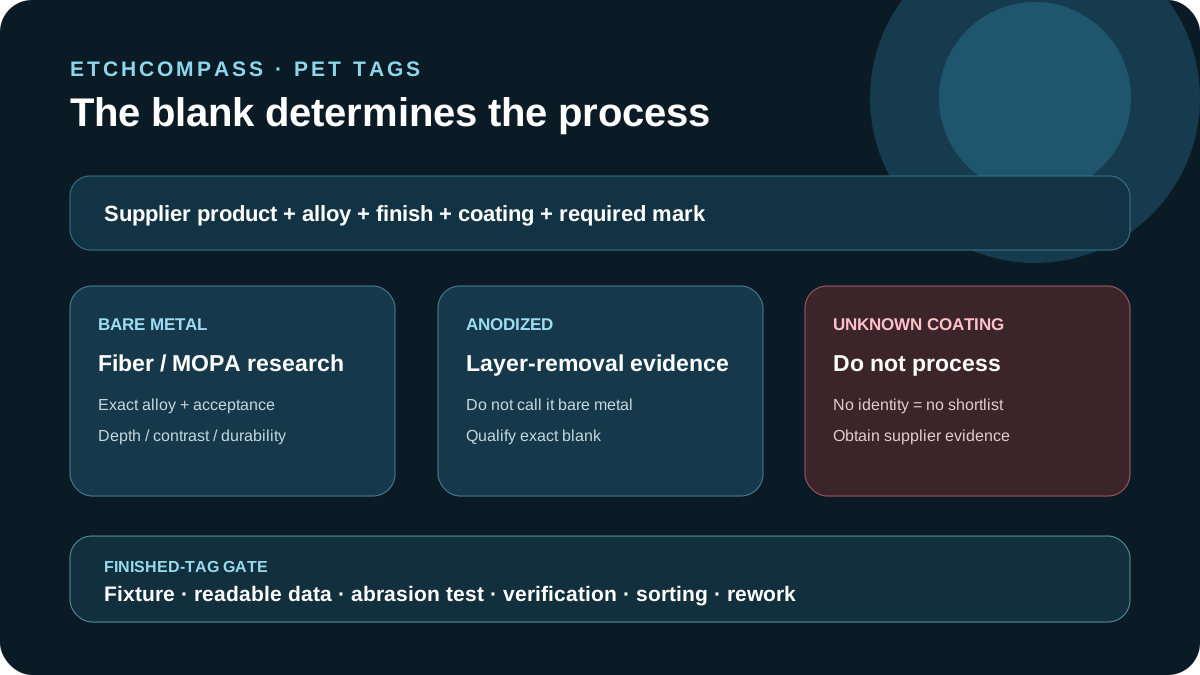
Best for identified bare-metal tags
A conventional fiber platform such as B6 Fiber is the first research path for qualified bare-metal marking when adjustable MOPA pulse behavior is not required. MOPA candidates enter only when exact-blank samples prove a useful contrast, heat or process-control advantage.
Record alloy, thickness, finish, field lens, mark depth or contrast, durability requirement and inspection method.
Best for anodized or coated tags
Anodized aluminum and coated tags can expose a contrasting layer with a documented laser process. That is not direct bare-metal engraving. Selected diode, CO₂, fiber or MOPA systems may participate only when the exact blank and operation appear in current documentation.
Keep unknown paint, plating, adhesive film and imported blank chemistry out of production until the supplier record is complete.
Design for readable, durable information
Define minimum text size, line count, phone-number format, contrast, abrasion exposure, edge clearance and front/back layout. Test the smallest real order, not an enlarged promotional sample.
If QR or serialized data is offered, use a controlled data source, fixture orientation and verification step. A visually sharp code is not automatically scan-qualified.
Model batch handling
Gravotech documents batch-oriented anodized-aluminum tag personalization. Whatever machine is selected, capacity includes importing names, proofing, tag loading, focus, marking, verification, sorting, packaging and rework.
Use a keyed fixture that prevents rotation and blank mix-ups. Treat published head speed as a component claim, not tags per hour.
Who should choose neither
Choose neither when the blank alloy, anodized layer or coating is unknown; the required durability is undefined; the tag cannot be fixtured consistently; or the open-beam and emissions controls are unresolved.
Mechanical engraving or outsourced marking can be the stronger path for low volume, unusually deep marks or supplier-certified tag systems.
Pet-tag sources were rechecked 8 Sep 2026. Recommendations are process research paths, not hands-on rankings or durability guarantees.
Decision criteria
Primary and authoritative sources
A source link supports the stated fact; it is not an endorsement.
- Gravotech: pet and dog tag engraving
- LaserPecker: pet-tag engraving machine guide
- OSHA: laser hazards and controls
- ComMarker B6 Fiber: Official ComMarker B6 conventional-fiber product page
- ComMarker B6 MOPA: Official ComMarker B6 JPT MOPA page
- Monport GM 60W Pro MOPA: Official GM60 Pro MOPA product page
- Monport GM 60W Pro MOPA: Official GM Pro quick-start manual
- xTool F2 Ultra: xTool F2 Ultra official product page
- xTool F2 Ultra: xTool F2 Ultra official manual
- xTool F2 Ultra: xTool F2 Ultra material routing