Best for
- Portrait and memorial-product businesses
- Personalization shops adding photographic products
- Buyers choosing between CO₂, diode and metal marking
Watch for
- DPI claims are not finished-image quality
- Every substrate needs its own tonal calibration
- Customer photos require privacy and licensing controls
Machines in this decision
Merchant links are standard outbound links. No active affiliate relationship is recorded, and relationships never affect rankings or tool results. Affiliate status is not a ranking input.
xTool P2S
Evidence recordCO2 · 55 W · 600 × 305 mm
- Fit
- premium enclosed CO₂ workflow
- Watch
- regional SKU/class and warranty must match
- Price context
- $2,799 — US standalone displayed price observed 15 Sep 2026; storefront also labeled P2S Pre Order, so dispatch remains unresolved
OMTech Polar Lite
Evidence recordCO2 · 55 W · 510 × 300 mm
- Fit
- enclosed desktop CO₂ buyers
- Watch
- US price and support context
- Price context
- $1,999.99 — US promotional price observed 3 Sep 2026
WeCreat Vision Pro
Evidence recordDiode · 45 W · 500 × 320 mm
- Fit
- enclosed diode workflow
- Watch
- clear acrylic is not a documented cutting fit for the diode process
- Price context
- $1,990 — US 45W Basic package observed 11 Sep 2026; not an installed quote; price and bundle can change
ComMarker B6 MOPA
Evidence recordMOPA fiber · 20 W, 30 W or 60 W configurations · Lens/configuration dependent
- Fit
- dedicated MOPA station
- Watch
- open workflow needs controlled-area assessment
- Price context
- From $2,599 — US 20 W Basic price observed 7 Sep 2026; 30 W and 60 W Basic configurations were $3,099 and $3,999, and control bundles cost more
Evidence desk
Side-by-side documented facts
Each record shows its evidence date. Prices, bundles, availability and regional terms can change; recheck the exact configuration before purchase.
| Criterion | xTool P2S | OMTech Polar Lite | WeCreat Vision Pro | ComMarker B6 MOPA |
|---|---|---|---|---|
| Laser process | CO2 · 55 W | CO2 · 55 W | Diode · 45 W | MOPA fiber · 20 W, 30 W or 60 W configurations |
| Published work area | 600 × 305 mm | 510 × 300 mm | 500 × 320 mm | Lens/configuration dependent |
| Enclosure / class context | Sold in documented Class 1 and Class 4 versions; verify the exact SKU before purchase | Fully enclosed | Full-metal enclosure; manufacturer states FDA Class 1 with lid-open shutdown and fire detection | Open marking format in reviewed product evidence |
| Ventilation context | Built-in 145 CFM exhaust fan and exhaust hose; official guidance routes outdoors and filtration is optional | Built-in exhaust fans and exhaust pipe; verify route and local requirements | Official manual directs outdoor venting or a suitable WeCreat extractor; longer hose can weaken extraction | No universal extraction configuration established |
| Machine dimensions | 1,000 × 639 × 268 mm | Not established in the reviewed evidence | 680 × 530 × 253–393 mm | Not established in the reviewed evidence |
| Published weight | 45 kg (99.21 lb) | Not established in the reviewed evidence | 21 kg | Not established in the reviewed evidence |
| Rotary compatibility | Optional rotary; official FAQ lists geometry limits that change when the riser base is used | Not established in the reviewed evidence | Optional Rotary Pro; chuck, sphere and ring ranges differ and must match the exact object | Not established in the reviewed evidence |
| Electrical / cooling | Maximum machine input listed as 700 W; verify the selected regional voltage and complete accessory load · Built-in liquid-cooling system requires purified water and model-specific, temperature-dependent antifreeze preparation | Not established in the reviewed evidence | No CO₂ water loop; optics, debris path and any extractor filters still require documented maintenance | Not established in the reviewed evidence |
| Software | xTool Studio/XCS by USB, Wi-Fi or IP; LightBurn works by cable but does not support the cameras or autofocus | Not established in the reviewed evidence | MakeIt by USB or Wi-Fi; LightBurn 1.6+ requires a GCode license and direct USB, with camera support requiring 1.7+ | Not established in the reviewed evidence |
| Availability | US standalone and bundles listed for sale on 3 Sep 2026; recheck the exact SKU, classification and cart | Official US product and comparison pages rechecked 7 Sep 2026; verify the exact cart and bundle | Listed for sale on the US product page on 3 Sep 2026 | 20 W, 30 W and 60 W configurations listed for sale on the official US page on 7 Sep 2026 |
| Published price | $2,799. US standalone displayed price observed 15 Sep 2026; storefront also labeled P2S Pre Order, so dispatch remains unresolved | $1,999.99. US promotional price observed 3 Sep 2026 | $1,990. US 45W Basic package observed 11 Sep 2026; not an installed quote; price and bundle can change | From $2,599. US 20 W Basic price observed 7 Sep 2026; 30 W and 60 W Basic configurations were $3,099 and $3,999, and control bundles cost more |
| Warranty context | US P2-series terms: 12 months main components, six months laser tube and three months mirrors/focusing lens; regional terms differ | 24 months; official page states two virtual technical-support sessions | US product and manual state 12 months; verify current regional terms | Verify current regional warranty before purchase |
| Specification record date | Sep 7, 2026 | Sep 7, 2026 | Sep 3, 2026 | Sep 7, 2026 |
| Later field checks | price: Sep 15, 2026 — USD 2,799 — P2S standalone displayed offer; availability: Sep 15, 2026 — Pre Order label displayed; exact dispatch date not established | No separately dated field update | price: Sep 11, 2026 — USD 1,990 — 45W Basic package | No separately dated field update |
Best for wood, acrylic, glass and slate research
CO₂ systems such as P2S or Polar Lite are the primary research path when the catalog centers documented wood, acrylic, glass-surface or slate workflows and the bed fits the product. Enclosed diode systems can be viable for selected wood and opaque documented stock.
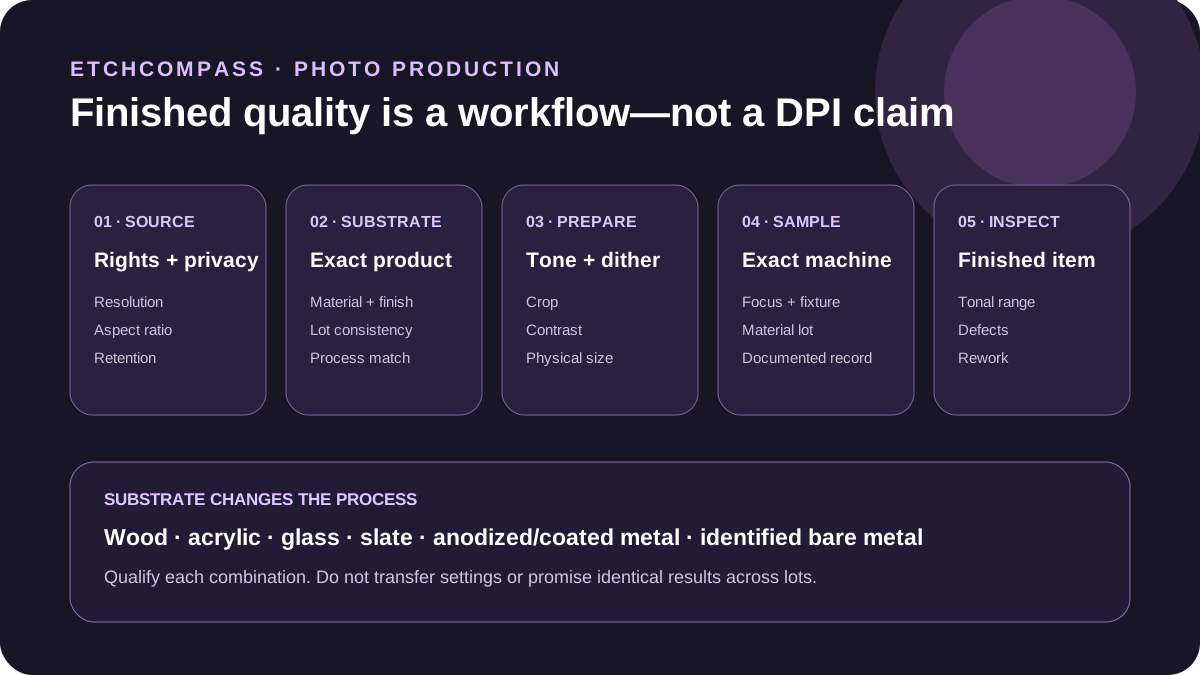
The substrate changes the image. Grain, color, coating, thickness and surface finish must be controlled across production lots.
Best for metal photo marking research
Fiber or MOPA enters the shortlist for an identified metal, anodized layer or qualified coating when the required tonal or halftone result is demonstrated on the exact system. A metal-marking source is not a substitute for relief engraving on wood or slate.
Require a sample that matches the final alloy, finish, lens, size and viewing condition. Do not infer repeatability from a promotional photograph.
Prepare the image for the substrate
Crop for the product, correct tone and local contrast, choose a documented dithering method, size to the physical output and preview at the actual aspect ratio. Trotec, Epilog and xTool each describe photo-preparation workflows; none creates universal settings for every machine and material.
Keep the original, edited master, output file and production record separate. Record software version, physical size, material lot and inspection result.
Qualify finished-image quality
Use a representative test image containing highlights, midtones, shadows, fine detail and faces. Inspect banding, clipping, focus variation, surface inconsistency, residue and cleaning damage under a defined viewing condition.
Calculate cycle time from preparation, staging, focus, engraving, cleaning, inspection, packaging and rework. Head-speed claims cannot be converted directly into portraits per hour.
Who should choose neither
Choose neither when the substrate is unidentified, coated or composite without documentation; when customer-image permissions and retention are unresolved; or when samples do not meet the tonal acceptance criteria.
Outsource the first products or one specialist substrate while building an evidence-backed catalog. Never promise that one photograph will reproduce identically across material lots.
Photo guides were rechecked 8 Sep 2026. Use them for preparation principles, then qualify the exact machine, substrate and output—never copy universal settings.
Decision criteria
Primary and authoritative sources
A source link supports the stated fact; it is not an endorsement.
- Trotec: photo laser engraving workflow
- Epilog: laser photo engraving applications
- xTool: preparing a photo for laser engraving
- OSHA: laser hazards and controls
- xTool P2S: Official xTool P2S US product page
- xTool P2S: Official xTool P2S user guide
- xTool P2S: Official P2S classification and material-safety guidance
- xTool P2S: Official P2-series warranty periods
- OMTech Polar Lite: Official OMTech Polar Lite page
- WeCreat Vision Pro: Official WeCreat Vision Pro product page
- WeCreat Vision Pro: Official Vision Pro 45W manual
- WeCreat Vision Pro: Official LightBurn connection requirements
- WeCreat Vision Pro: Official Vision Pro passthrough guide
- ComMarker B6 MOPA: Official ComMarker B6 JPT MOPA page